> ## Documentation Index
> Fetch the complete documentation index at: https://openmetadata-format-2-0-connector-overview-pages.mintlify.site/llms.txt
> Use this file to discover all available pages before exploring further.
# Lineage Workflow | OpenMetadata Data Lineage Guide
> Discover how to set up data lineage workflows in OpenMetadata. Learn to track data flow, configure connectors, and visualize dependencies across your data pipeline.
export const connector_0 = "bigquery"
# Lineage Workflow
Learn how to configure the Lineage workflow from the UI to ingest Lineage data from your data sources.
Check out the documentation of the connector you are using to know if it supports automated lineage workflow.
If your database service is not yet supported, you can use this same workflow by providing a Query Log file!
Learn how to do so 👇
Configure the lineage workflow by providing a Query Log file.
## UI Configuration
Once the metadata ingestion runs correctly and we are able to explore the service Entities, we can add Entity Lineage information.
This will populate the **Lineage** tab from the Table Entity Page.
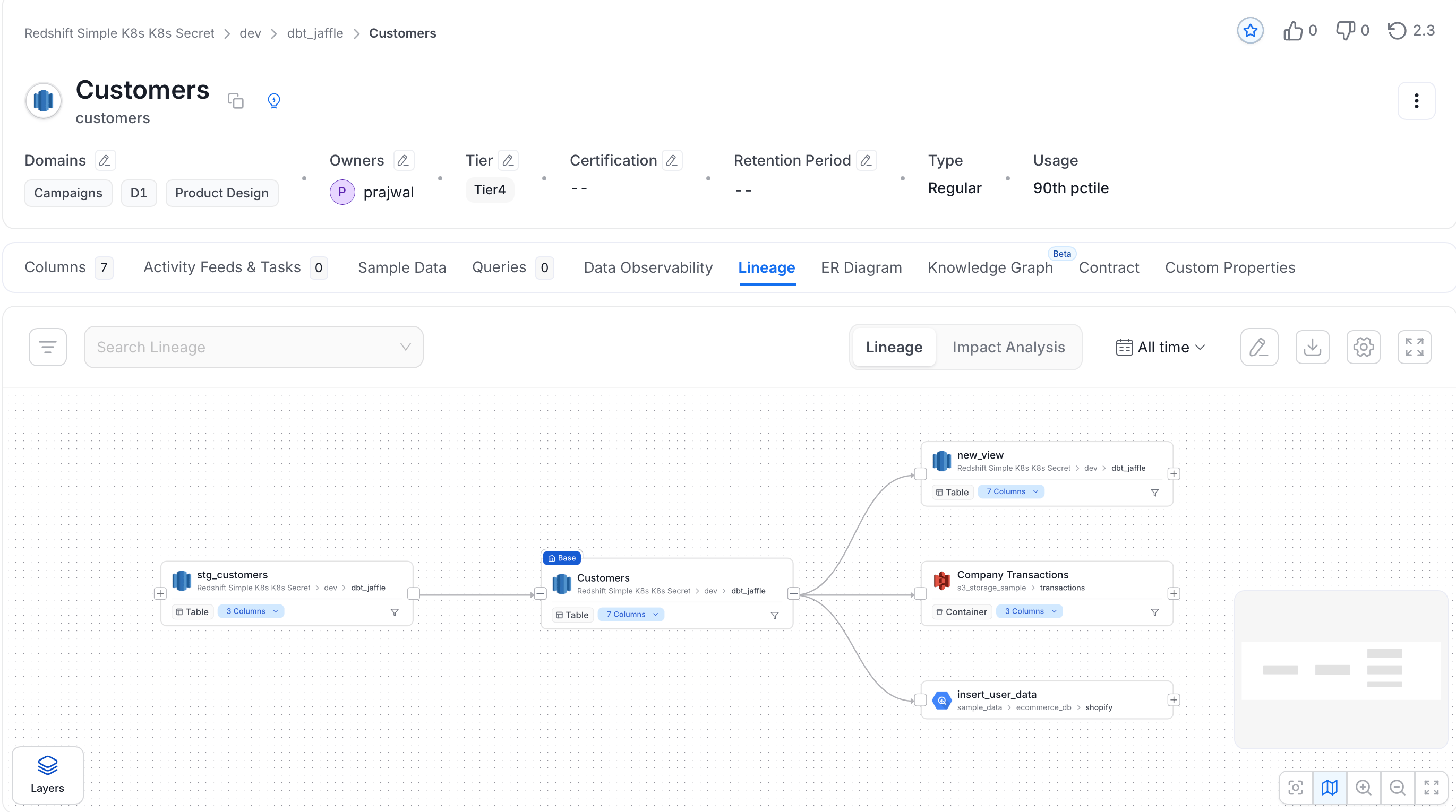 We can create a workflow that will obtain the query log and table creation information from the underlying database and feed it to OpenMetadata. The Lineage Agent will be in charge of obtaining this data.
### Step 1: Add a Lineage Agent
Navigate to your service and launch the Lineage Agent wizard.
1. Navigate to **Settings** > **Services** and select the service type.
2. Click the service you have added.
3. Open the **Agents** tab and click **Add Agent** > **Lineage**.
We can create a workflow that will obtain the query log and table creation information from the underlying database and feed it to OpenMetadata. The Lineage Agent will be in charge of obtaining this data.
### Step 1: Add a Lineage Agent
Navigate to your service and launch the Lineage Agent wizard.
1. Navigate to **Settings** > **Services** and select the service type.
2. Click the service you have added.
3. Open the **Agents** tab and click **Add Agent** > **Lineage**.
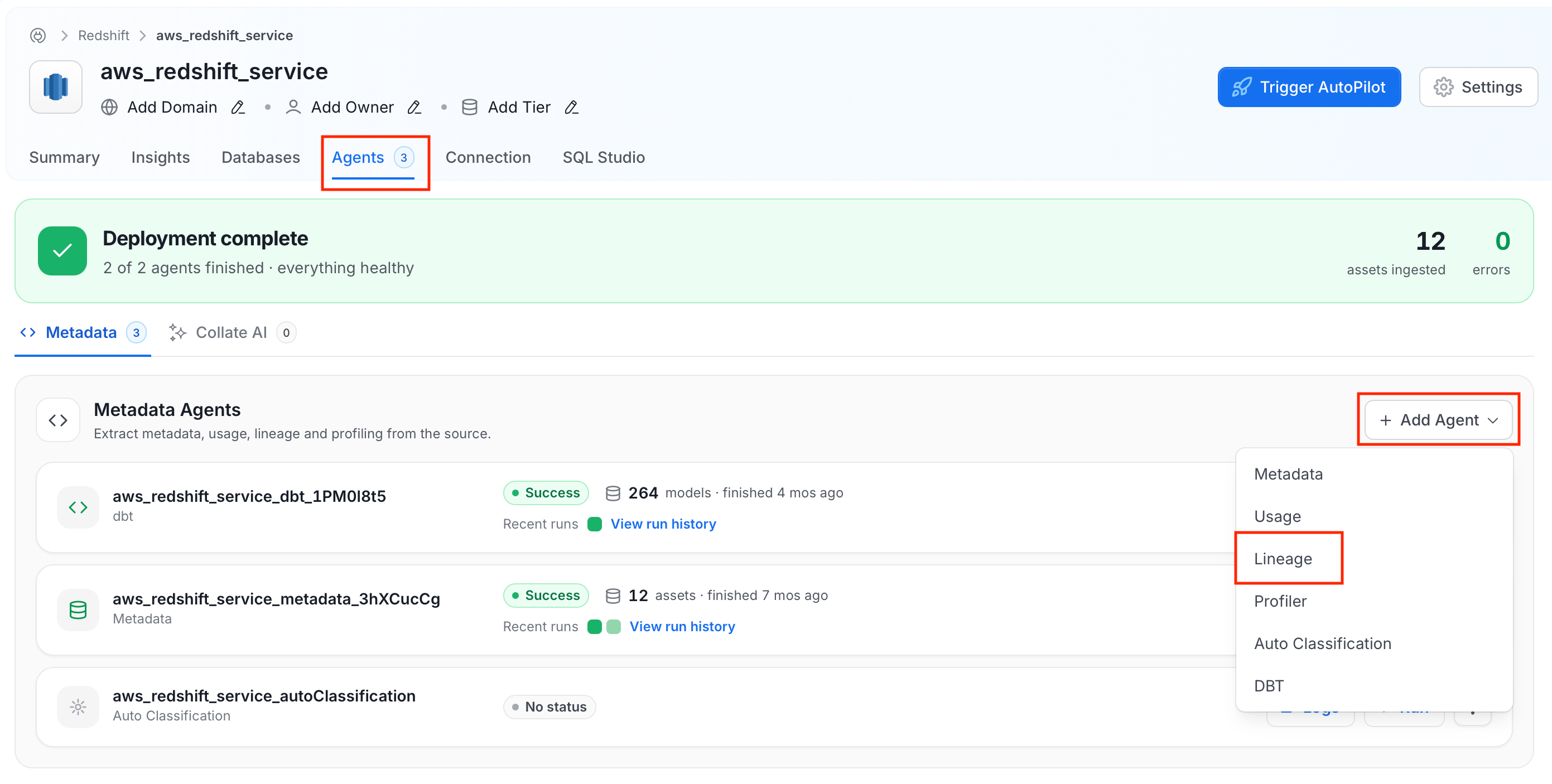 4. Give the agent a recognisable name and click **Next**.
### Step 2: Configure the Agent
Configure the core parameters for this agent.
4. Give the agent a recognisable name and click **Next**.
### Step 2: Configure the Agent
Configure the core parameters for this agent.
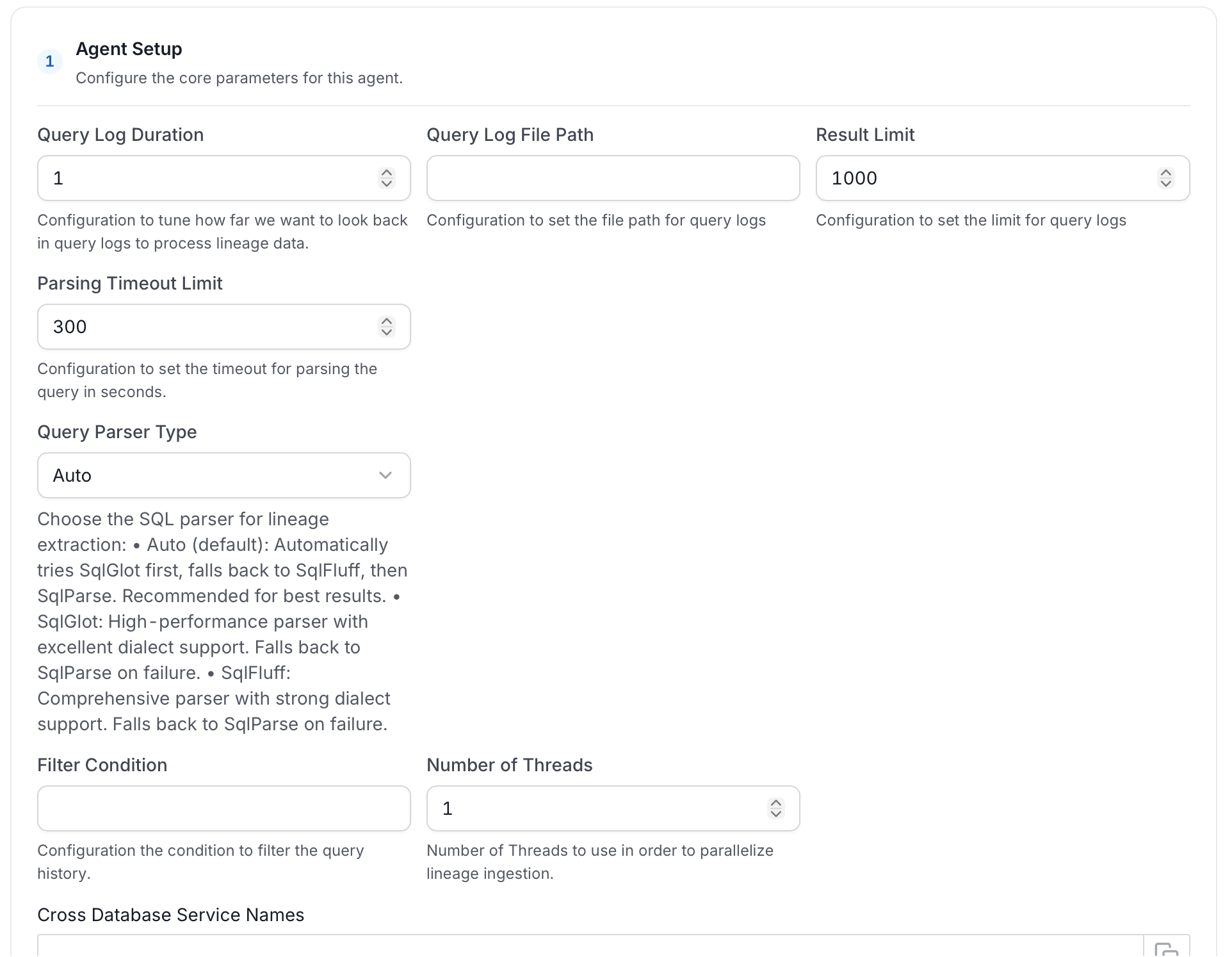 **Agent Setup**
| Field | Default | Description |
| ------------------------------------ | ------- | ------------------------------------------------------------------------------------------------------------------------------------------------------------------------------------------------------------------------------------------------------------------------------------------------------------- |
| **Query Log Duration** | `1` | How many days back to look in the query log. |
| **Query Log File Path** | — | Path to a query log file. Use this instead of reading directly from the database. |
| **Result Limit** | `1000` | Maximum number of query log rows to process per run. |
| **Parsing Timeout Limit** | `300` | Timeout in seconds for parsing a single SQL query. |
| **Query Parser Type** | `Auto` | SQL parser for lineage extraction. **Auto** tries SqlGlot first, then SqlFluff, then SqlParse. **SqlGlot** offers high performance with excellent dialect support. **SqlFluff** provides comprehensive dialect support. |
| **Filter Condition** | — | SQL condition applied to the query history result set to exclude specific queries. See [Usage Query Filtering](/v2.0.x-SNAPSHOT/connectors/ingestion/workflows/usage/filter-query-set). |
| **Number of Threads** | `1` | Number of threads to use for parallel lineage ingestion. |
| **Cross Database Service Names** | — | Names of other OpenMetadata services to search when resolving table references during lineage extraction. List specific service names. The underlying lookup returns a limited number of matches, so `*` can miss the correct service or resolve to the wrong table when many services or tables share names. |
| **Override View Lineage** | Off | When enabled, overwrites existing view lineage on each run. |
| **Process View Lineage** | On | Parse view definitions for lineage. |
| **Process Query Lineage** | On | Parse query logs for lineage. |
| **Process Stored Procedure Lineage** | On | Parse stored procedure definitions for lineage. |
| **Process Cross Database Lineage** | Off | Build lineage across tables in different databases or projects (for example, across BigQuery projects). Also set **Cross Database Service Names** when enabling this option. See [Cross Database Lineage](/v2.0.x-SNAPSHOT/how-to-guides/data-lineage/cross-database-lineage). |
| **Enable Temp Table Lineage** | Off | Handle lineage for Snowflake temporary and transient tables. |
| **Incremental Lineage Processing** | On | Process only new or changed lineage data on each run. |
**Filter Patterns**
Apply regex patterns to include or exclude specific databases, schemas, tables, or stored procedures.
**Scope & Behaviour**
| Field | Description |
| -------------------- | -------------------------------------------------------------- |
| **Enable Debug Log** | Turn on verbose logging to help troubleshoot ingestion issues. |
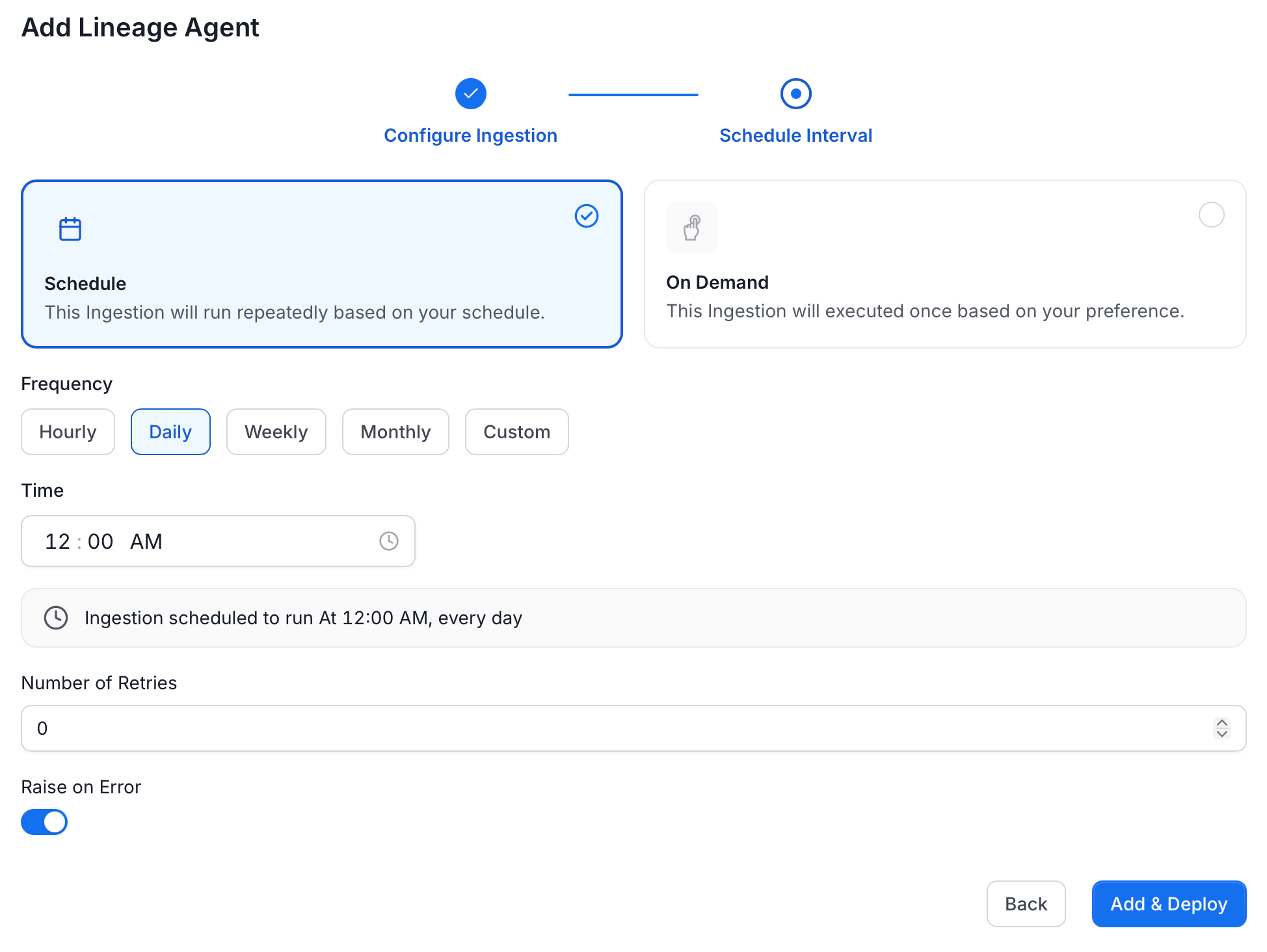
### Step 3: Schedule and Deploy
Choose how the lineage agent should run:
* **Schedule**: Runs repeatedly based on a defined interval. Set the **Frequency** (Hourly, Daily, Weekly, Monthly, or Custom) and the **Time** to run.
* **On Demand**: Runs once when manually triggered.
Configure the remaining options:
* **Number of Retries**: How many times to retry if the ingestion fails.
* **Raise on Error**: Toggle on to surface errors immediately rather than silently skipping them.
Click **Add & Deploy** to save and activate the lineage agent.
**Agent Setup**
| Field | Default | Description |
| ------------------------------------ | ------- | ------------------------------------------------------------------------------------------------------------------------------------------------------------------------------------------------------------------------------------------------------------------------------------------------------------- |
| **Query Log Duration** | `1` | How many days back to look in the query log. |
| **Query Log File Path** | — | Path to a query log file. Use this instead of reading directly from the database. |
| **Result Limit** | `1000` | Maximum number of query log rows to process per run. |
| **Parsing Timeout Limit** | `300` | Timeout in seconds for parsing a single SQL query. |
| **Query Parser Type** | `Auto` | SQL parser for lineage extraction. **Auto** tries SqlGlot first, then SqlFluff, then SqlParse. **SqlGlot** offers high performance with excellent dialect support. **SqlFluff** provides comprehensive dialect support. |
| **Filter Condition** | — | SQL condition applied to the query history result set to exclude specific queries. See [Usage Query Filtering](/v2.0.x-SNAPSHOT/connectors/ingestion/workflows/usage/filter-query-set). |
| **Number of Threads** | `1` | Number of threads to use for parallel lineage ingestion. |
| **Cross Database Service Names** | — | Names of other OpenMetadata services to search when resolving table references during lineage extraction. List specific service names. The underlying lookup returns a limited number of matches, so `*` can miss the correct service or resolve to the wrong table when many services or tables share names. |
| **Override View Lineage** | Off | When enabled, overwrites existing view lineage on each run. |
| **Process View Lineage** | On | Parse view definitions for lineage. |
| **Process Query Lineage** | On | Parse query logs for lineage. |
| **Process Stored Procedure Lineage** | On | Parse stored procedure definitions for lineage. |
| **Process Cross Database Lineage** | Off | Build lineage across tables in different databases or projects (for example, across BigQuery projects). Also set **Cross Database Service Names** when enabling this option. See [Cross Database Lineage](/v2.0.x-SNAPSHOT/how-to-guides/data-lineage/cross-database-lineage). |
| **Enable Temp Table Lineage** | Off | Handle lineage for Snowflake temporary and transient tables. |
| **Incremental Lineage Processing** | On | Process only new or changed lineage data on each run. |
**Filter Patterns**
Apply regex patterns to include or exclude specific databases, schemas, tables, or stored procedures.
**Scope & Behaviour**
| Field | Description |
| -------------------- | -------------------------------------------------------------- |
| **Enable Debug Log** | Turn on verbose logging to help troubleshoot ingestion issues. |
### Step 3: Schedule and Deploy
Choose how the lineage agent should run:
* **Schedule**: Runs repeatedly based on a defined interval. Set the **Frequency** (Hourly, Daily, Weekly, Monthly, or Custom) and the **Time** to run.
* **On Demand**: Runs once when manually triggered.
Configure the remaining options:
* **Number of Retries**: How many times to retry if the ingestion fails.
* **Raise on Error**: Toggle on to surface errors immediately rather than silently skipping them.
Click **Add & Deploy** to save and activate the lineage agent.
 ## YAML Configuration
In the [connectors](/v2.0.x-SNAPSHOT/connectors) section we showcase how to run the metadata ingestion from a JSON/YAML file using the Airflow SDK or the CLI via metadata ingest. Running a lineage workflow is also possible using a JSON/YAML configuration file.
This is a good option if you wish to execute your workflow via the Airflow SDK or using the CLI; if you use the CLI a lineage workflow can be triggered with the command `metadata ingest -c FILENAME.yaml`. The `serviceConnection` config will be specific to your connector (you can find more information in the [connectors](/v2.0.x-SNAPSHOT/connectors) section), though the sourceConfig for the lineage will be similar across all connectors.
## Lineage
After running a Metadata Ingestion workflow, we can run Lineage workflow.
While the `serviceName` will be the same to that was used in Metadata Ingestion, so the ingestion bot can get the `serviceConnection` details from the server.
### 1. Define the YAML Config
This is a sample config for {connector_0} Lineage:
Configure the source type and service name for your lineage workflow.
You can find all the definitions and types for the `sourceConfig` [here](https://github.com/open-metadata/OpenMetadata/blob/main/openmetadata-spec/src/main/resources/json/schema/metadataIngestion/databaseServiceQueryLineagePipeline.json).
**type**: Set to `DatabaseLineage` for database lineage ingestion.
**queryLogDuration**: Configuration to tune how far we want to look back in query logs to process lineage data in days.
**parsingTimeoutLimit**: Configuration to set the timeout for parsing the query in seconds.
**filterCondition**: Condition to filter the query history.
**resultLimit**: Configuration to set the limit for query logs.
**queryLogFilePath**: Configuration to set the file path for query logs. If instead of getting the query logs from the database we want to pass a file with the queries.
**databaseFilterPattern**: Regex to only fetch databases that matches the pattern.
**schemaFilterPattern**: Regex to only fetch tables or databases that matches the pattern.
**tableFilterPattern**: Regex to only fetch tables or databases that matches the pattern.
**overrideViewLineage**: Set the 'Override View Lineage' toggle to control whether to override the existing view lineage.
**processViewLineage**: Set the 'Process View Lineage' toggle to control whether to process view lineage.
**processQueryLineage**: Set the 'Process Query Lineage' toggle to control whether to process query lineage.
**processStoredProcedureLineage**: Set the 'Process Stored ProcedureLog Lineage' toggle to control whether to process stored procedure lineage.
**threads**: Number of Threads to use in order to parallelize lineage ingestion.
To send the metadata to OpenMetadata, it needs to be specified as `type: metadata-rest`.
```yaml theme={null}
source:
type: bigquery-lineage
serviceName: bigquery
sourceConfig:
config:
type: DatabaseLineage
# Number of days to look back
queryLogDuration: 1
parsingTimeoutLimit: 300
# filterCondition: query_text not ilike '--- metabase query %'
resultLimit: 1000
# If instead of getting the query logs from the database we want to pass a file with the queries
# queryLogFilePath: /tmp/query_log/file_path
# databaseFilterPattern:
# includes:
# - database1
# - database2
# excludes:
# - database3
# schemaFilterPattern:
# includes:
# - schema1
# - schema2
# excludes:
# - schema3
# tableFilterPattern:
# includes:
# - table1
# - table2
# excludes:
# - table3
# - table4
overrideViewLineage: false
processViewLineage: true
processQueryLineage: true
processStoredProcedureLineage: true
threads: 1
sink:
type: metadata-rest
config: {}
```
* You can learn more about how to configure and run the Lineage Workflow to extract Lineage data from [here](/connectors/ingestion/workflows/lineage)
### 2. Run with the CLI
After saving the YAML config, we will run the command the same way we did for the metadata ingestion:
```bash theme={null}
metadata ingest -c
```
## YAML Configuration
In the [connectors](/v2.0.x-SNAPSHOT/connectors) section we showcase how to run the metadata ingestion from a JSON/YAML file using the Airflow SDK or the CLI via metadata ingest. Running a lineage workflow is also possible using a JSON/YAML configuration file.
This is a good option if you wish to execute your workflow via the Airflow SDK or using the CLI; if you use the CLI a lineage workflow can be triggered with the command `metadata ingest -c FILENAME.yaml`. The `serviceConnection` config will be specific to your connector (you can find more information in the [connectors](/v2.0.x-SNAPSHOT/connectors) section), though the sourceConfig for the lineage will be similar across all connectors.
## Lineage
After running a Metadata Ingestion workflow, we can run Lineage workflow.
While the `serviceName` will be the same to that was used in Metadata Ingestion, so the ingestion bot can get the `serviceConnection` details from the server.
### 1. Define the YAML Config
This is a sample config for {connector_0} Lineage:
Configure the source type and service name for your lineage workflow.
You can find all the definitions and types for the `sourceConfig` [here](https://github.com/open-metadata/OpenMetadata/blob/main/openmetadata-spec/src/main/resources/json/schema/metadataIngestion/databaseServiceQueryLineagePipeline.json).
**type**: Set to `DatabaseLineage` for database lineage ingestion.
**queryLogDuration**: Configuration to tune how far we want to look back in query logs to process lineage data in days.
**parsingTimeoutLimit**: Configuration to set the timeout for parsing the query in seconds.
**filterCondition**: Condition to filter the query history.
**resultLimit**: Configuration to set the limit for query logs.
**queryLogFilePath**: Configuration to set the file path for query logs. If instead of getting the query logs from the database we want to pass a file with the queries.
**databaseFilterPattern**: Regex to only fetch databases that matches the pattern.
**schemaFilterPattern**: Regex to only fetch tables or databases that matches the pattern.
**tableFilterPattern**: Regex to only fetch tables or databases that matches the pattern.
**overrideViewLineage**: Set the 'Override View Lineage' toggle to control whether to override the existing view lineage.
**processViewLineage**: Set the 'Process View Lineage' toggle to control whether to process view lineage.
**processQueryLineage**: Set the 'Process Query Lineage' toggle to control whether to process query lineage.
**processStoredProcedureLineage**: Set the 'Process Stored ProcedureLog Lineage' toggle to control whether to process stored procedure lineage.
**threads**: Number of Threads to use in order to parallelize lineage ingestion.
To send the metadata to OpenMetadata, it needs to be specified as `type: metadata-rest`.
```yaml theme={null}
source:
type: bigquery-lineage
serviceName: bigquery
sourceConfig:
config:
type: DatabaseLineage
# Number of days to look back
queryLogDuration: 1
parsingTimeoutLimit: 300
# filterCondition: query_text not ilike '--- metabase query %'
resultLimit: 1000
# If instead of getting the query logs from the database we want to pass a file with the queries
# queryLogFilePath: /tmp/query_log/file_path
# databaseFilterPattern:
# includes:
# - database1
# - database2
# excludes:
# - database3
# schemaFilterPattern:
# includes:
# - schema1
# - schema2
# excludes:
# - schema3
# tableFilterPattern:
# includes:
# - table1
# - table2
# excludes:
# - table3
# - table4
overrideViewLineage: false
processViewLineage: true
processQueryLineage: true
processStoredProcedureLineage: true
threads: 1
sink:
type: metadata-rest
config: {}
```
* You can learn more about how to configure and run the Lineage Workflow to extract Lineage data from [here](/connectors/ingestion/workflows/lineage)
### 2. Run with the CLI
After saving the YAML config, we will run the command the same way we did for the metadata ingestion:
```bash theme={null}
metadata ingest -c
```