> ## Documentation Index
> Fetch the complete documentation index at: https://openmetadata-format-2-0-connector-overview-pages.mintlify.site/llms.txt
> Use this file to discover all available pages before exploring further.
# Glossary Export | OpenMetadata Export Guide
> Export glossary terms in bulk for backup, migration, or sharing with stakeholders or external systems.
# Glossary Export
Exporting a glossary from OpenMetadata is easy.
* Navigate to **Govern > Glossary**
* Click on the **⋮** icon and **Export** the glossary file.
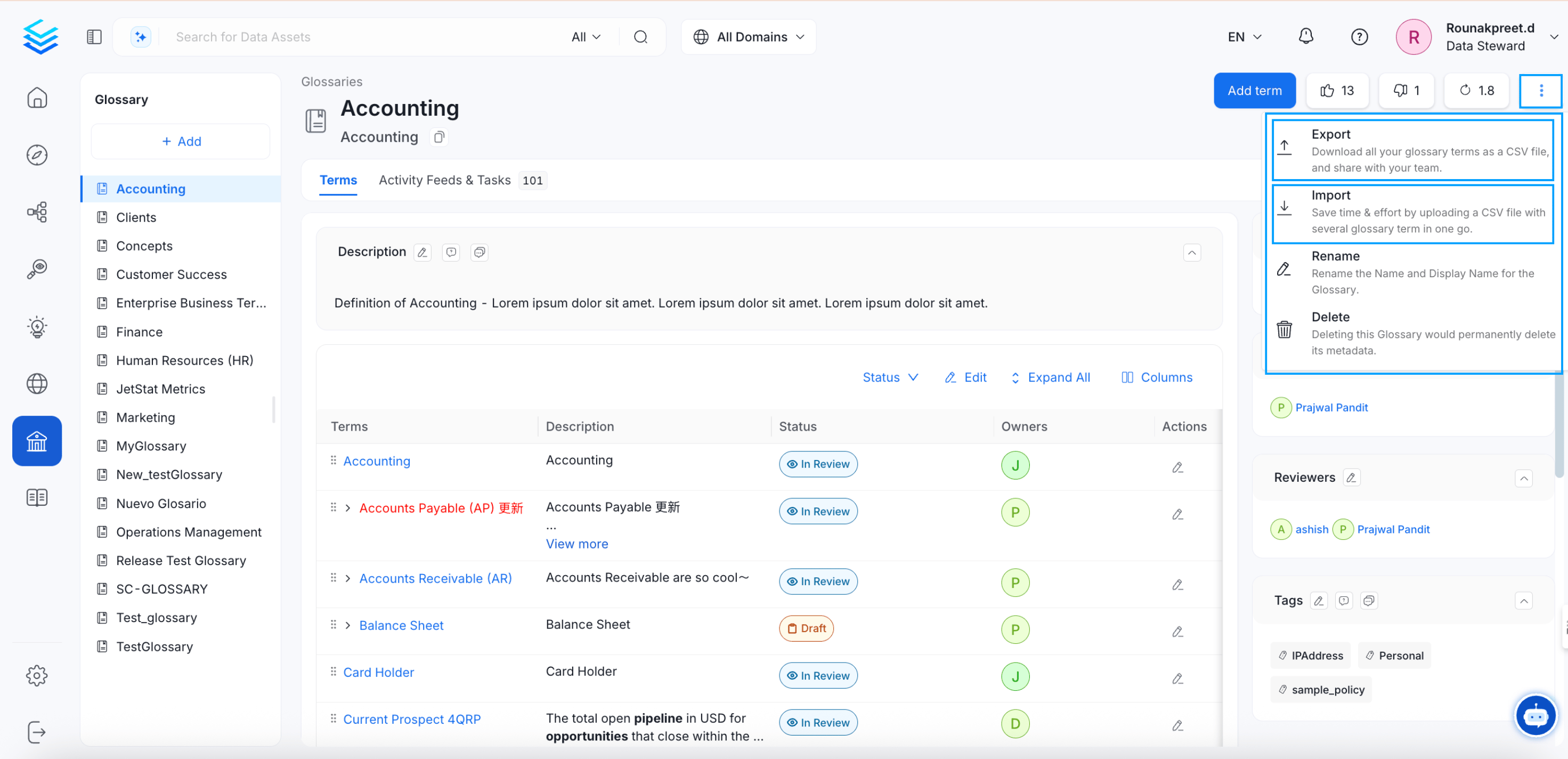 If you have glossary terms in your Glossary, the same will be exported as a CSV file. If you have If there are no terms in the Glossary, then a blank CSV template will be downloaded.
Save time and effort by bulk uploading glossary terms using a CSV file.
Set up a review and approval process for glossary terms
If you have glossary terms in your Glossary, the same will be exported as a CSV file. If you have If there are no terms in the Glossary, then a blank CSV template will be downloaded.
Save time and effort by bulk uploading glossary terms using a CSV file.
Set up a review and approval process for glossary terms